By Nick Gelling
Product Test Journalist | Kaipūrongo Whakamātautau Hautaonga
Framework is a computer hardware company with a difference. It wants consumers to be free to upgrade, customise and repair their computers – and continue to use them for far longer. And, as of April 2026, Framework ships to New Zealand.
In today’s market, laptops often slow down or break within 5 years of purchase, and repairs usually cost too much to be worth pursuing. It’s bad for owners and bad for the planet – but great for computer manufacturers.
Framework’s arrival is the most consumer-friendly news for our PC market in years. It allows consumers who prefer the portability of a laptop computer to enjoy the same freedom and autonomy that’s previously been reserved for desktop owners.
Personally, as someone who’s been hoping to see Framework in New Zealand, I’m delighted.

Find the perfect laptop
We've tested laptops from brands including Acer, Apple, Microsoft and more.
How long do Framework computers last?
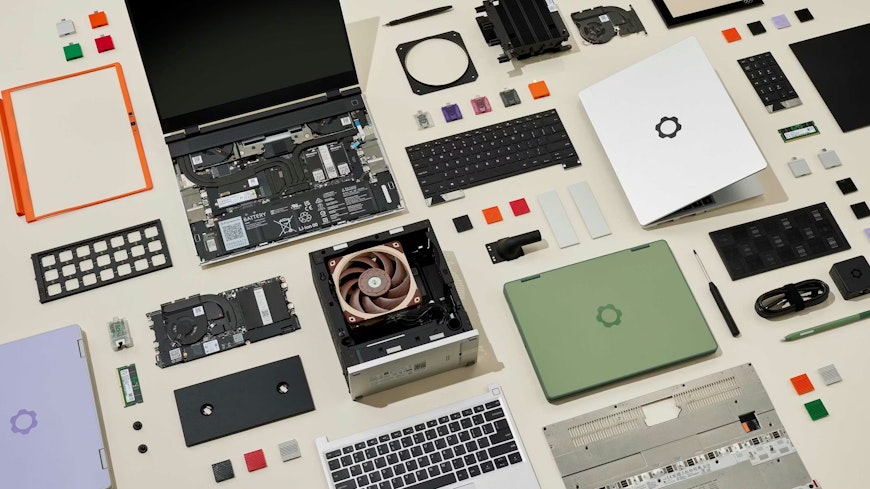
Framework disrupts the status quo by letting owners swap out individual modules when new parts release or an old part fails. This means a Framework laptop takes far longer to become obsolete, because it can be improved over time.
Framework’s first computers were sold in 2021, so their longevity is yet to be truly tested. However, those original laptops can still be upgraded to use newer, faster processors, which should afford them a second 5-year life on top of the 5 years they’ve managed to date.
Which Framework computer is right for me?
There are four Framework product lines for sale, with a fifth arriving in July. Because pricing depends on which modules you choose, it’s hard to give exact costs, but I’ve estimated the realistic price of a basic but functional configuration of each product. Shipping to New Zealand is free.
A warning: Framework computers aren’t cheap. To justify the cost, factor in that you can expect them to last longer.
The Framework Laptop 12 is the most affordable computer in the lineup, starting at about $1,500. It’s a 2-in-1 computer – its touchscreen and fold-back hinge mean you can use it as both a laptop and a tablet – and comes in a range of fun colours like lavender and bubblegum.
The Framework Laptop 13 was Framework’s first product. It’s a light, portable notebook starting at about $2,300.
The Framework Laptop 13 Pro (shipping from July, with pre-orders open now) is a premium model with greatly improved battery life. It can stream 4K video for 20 hours – competing with and even surpassing some leading competitors like the MacBook Pro. (The battery tests were conducted by Framework, but the company is making the test setup fully public so others can verify their numbers.) The 13 Pro also features a range of other improvements, including a touchscreen and WiFi 7 support. It starts at about $3,000.
The Framework Laptop 16 is big and performance focused. It’s ideal for gaming because you can upgrade its graphics card. It starts at about $3,200.
The Framework Desktop is a convenient way to build your own desktop computer that doesn’t involve sourcing a dozen components that’ll work together. The price varies greatly depending on the parts you choose but begins at about $3,000.
How can I customise my Framework computer?
When you buy a Framework computer, you can customise all the standard things, like how fast you want your processor to be and how much storage you need.
But it doesn’t stop there. You’re also free to customise how the computer looks. Variables include the colour of the screen border and just about anything about the keyboard, from whether you want a number pad to whether you’d prefer a British, US or International English layout.
There are slots for “expansion cards”, with options including ports like USB, HDMI or even Ethernet, extra storage, or SD cards. They can be swapped in and out while the computer is running, so if you buy more cards than you have slots, you can customise your loadout on the fly. This is particularly useful if there’s a port you only need occasionally, such as HDMI.
And you can buy more RAM to slot into your computer later, which is especially exciting given the current RAM pricing crisis – save money by buying a Framework with less RAM today, then buy more once RAM prices drop.
How do I repair my Framework computer?
Framework’s launch is a win for the right to repair in New Zealand’s tech industry – a much-needed shot in the arm after the government failed to act on the issue last year.
Every Framework computer comes with a screwdriver in the box – the only tool you need to take your laptop apart for repairs and upgrades.
Framework publishes official repair and replacement guides for dozens of components for free, from simple jobs like upgrading memory to fiddly ones like replacing the screen.
Should something go wrong, you can order spares of every component and replace them yourself (with a bit of belief in your own abilities).
Hundreds of new parts can be bought from Framework’s website. As well as replacement parts for repair, you can also buy new modules that have released since you bought your main unit.
Parts appear to be shipped from Taiwan, so shipping costs are about $35 per shipment. This is higher than we’d like, and probably the biggest barrier to buying a Framework computer (after all, the whole point is being able to buy new parts over time). We hope that, if Framework gets enough customers in this part of the world, it might be able to lower shipping costs in future by opening a closer distribution centre.
Framework freely releases its design specifications, so enthusiastic fans the world over can expand on them. For example, the 3D design of the laptop chassis is open-source, meaning users can design and publish new accessories that fit perfectly. If you have a 3D printer, you’ll be able to access these community-built additions for free.
Does Framework work with Linux?
Framework laptops run Windows 11, and that’s probably how most customers will interact with them. But, if you’ve had enough of Windows or are curious to try out alternatives, Framework is extremely Linux-friendly too. It provides official customer support to customers running Ubuntu or Fedora, two popular Linux distributions, as well as guides to installing several other distributions on each of its computers.
Plus, because Linux distributions are free, you can pay less for your Framework computer if you don’t need a Windows licence – essentially giving you a $285 discount for choosing Linux. Maybe that’s the push you need to embrace the penguin?