By James le Page
Former Product Test Team Leader | Kaiārahi Kapa Whakamātau Hautaonga
Is upgrading to the Apple Watch Series 9 worth it? James, our test team lead, reviews new features such as the Smart Stack and Always On watch face to find out how it compares to his much-loved Apple Watch SE.
I’m a firm Apple Watch convert. I purchased the Apple Watch SE (1st generation) three years ago and have never looked back. I’d compare the experience to the first time buying a smartphone. Did I need it? No. But now it’s hard to imagine life without one.
I mainly use my Apple Watch SE to track workouts, make contactless payments, control the music playing through my headphones, set timers while I’m cooking, and occasionally tell the time. So, I jumped at the chance to trial the new Series 9, which has a few features I hadn’t experienced before.
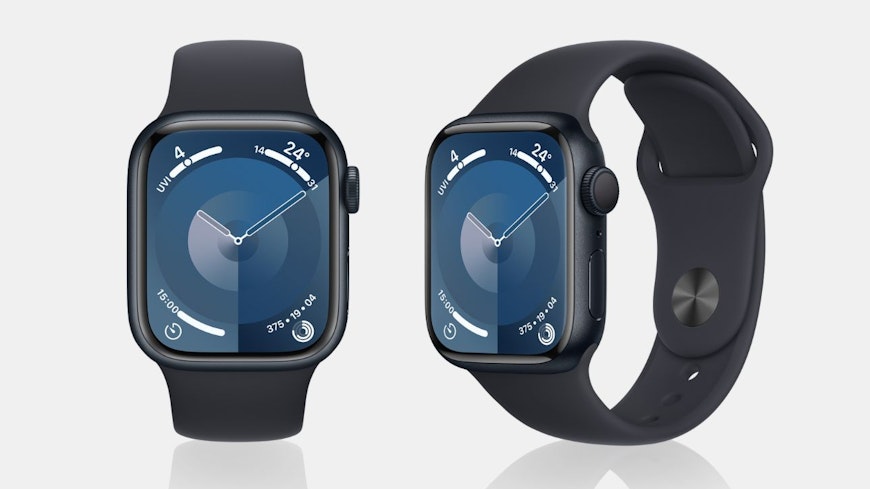
Apple Watch Series 9 specs (as trialled)
45mm GPS + Cellular $1,009
What sets the Series 9 Apple Watch apart from the SE?
Always on watch face that’s much brighter
Health tracking – like ECG and blood oxygen measurements
Smart Stack
The new Smart Stack feature lets you quickly access your most needed information. You can find it by scrolling down the bottom of the watch face or by using the double tap feature. Smart Stack displays a curated set of widgets (an at-a-glance view of an app’s most important data or functionality) that you can customise.
I had a go, but never took to the Smart Stack feature as my default while trialling the Series 9. But if you use something like your calendar for organising your life, then this will be handy to quickly show upcoming appointments and events.
Double tap
Double tap lets you control your watch only using one hand and without touching the display. It involves tapping your index finger and thumb together twice on your watch-wearing hand to bring up the Smart Stack or perform tasks like skipping or pausing music playback.
Double tap is a new feature; it’s the first iteration of the tech and doesn’t have many options for using it yet. The jury is still out, but I didn’t find double tap particularly useful because I don’t often find myself in a situation where my hand is full and can’t tap on the watch face itself.
Always On watch face
Always On lets you display the time even when your wrist is down. It’s a feature Apple introduced in the Series 5 and above, and it’s a big improvement from my SE. However, it’s not perfect – the second hand disappears when I lowered my wrist (not a dealbreaker but still not what I was expecting). When using the Always On watch face with your wrist down, other app functionality, like microseconds on the stopwatch, fade away. The watch’s functionality returns as soon as you lift the watch again, though.
I liked the Always On feature. It was convenient being able to quickly glance at my watch for the time, rather than performing an elaborate lift of the wrist to check like I do with my SE. The screen itself is brighter and a big improvement from my SE, too.
Health tracking
The Series 9 has a lot more health tracking features than my SE. The ECG feature is easy to use, and you can dive into the Health app on your phone to check out other stats like sleep tracking, respiration and oxygen saturation data in greater detail.
However, when weighing up buying an Apple Watch a few years back, I decided on the SE because I had no interest in the health tracking features. That hasn’t changed over time – I still wouldn’t spend the extra money on a Series 9 over the SE for health tracking purposes. My philosophy is that if I have an irregular heart rate, or maybe declining oxygen saturation, I’ll probably know about it as I’ll feel rubbish. But I can see the appeal of the Series 9 health tracking features if you’d like to be in the know about that sort of thing.
More computing power
The extra computing power was noticeable on the Series 9 – apps popped up quickly compared to my old SE. That’s the inevitable impact of father time on tech. I use Fitbod (an app) to track my gym workouts and it immediately appeared when I clicked on it. The faster processing power in the Series 9 makes for a much better user experience.
Would I upgrade to the Apple Watch Series 9?
Trialling the Series 9 has been great; I love my old Apple Watch SE and this one is much better. Would I shell out for the extra features myself? No. Other than the much nicer screen, and quicker response times, I really didn’t find that my experience was profoundly elevated. I’ll continue using my old SE till it dies, and probably buy the next iteration of that one.
However, I can certainly see the appeal in it for others. If you want a top-notch smartwatch, you can’t really do much better and it rates very highly in our test.
The Apple Watch Series 9 was loaned to Consumer by Apple.